
If you run a startup, a micro business or a small business with between 1 and 20 people, here's the good news: those stories almost certainly don't apply to you. With a modern, cloud-based ERP that's already set up for businesses like yours, most small business implementations take days, not weeks or months.
In this article we'll explain why, give you realistic timelines for different sizes and types of business, walk through what actually happens between kick-off and go-live, and share the steps that get you up and running fastest.
Why ERP has a reputation for taking months
ERP's reputation for long projects comes mostly from larger organisations. When a company with hundreds of staff, several sites and years of legacy systems replaces its ERP, the project really can take many months. That's because it usually involves:
- Dozens of departments, each with their own processes and priorities
- Complex approval chains and steering committees
- Large volumes of historic data from several old systems
- Extensive bespoke development and integrations
- Formal testing phases and staged rollouts across sites or countries
None of that describes a typical small business. When you have 1 to 20 people, decisions are made quickly, often by the owner. Processes are simpler, data volumes are smaller, and everyone who needs training can fit round one table.
The other big change is the software itself. Traditional ERP was installed on your own servers and heavily customised, which took time. A SaaS ERP such as Thrive ERP is already running in the cloud, already configured for UK businesses, and already set up for common ways of working in manufacturing, wholesale, distribution and e-commerce. Instead of building a system from scratch, you're tailoring one that's largely ready to go.
That's why small business implementations are measured in days.
How long does it really take? Typical timelines
Every business is different, but these are realistic timelines for businesses with 1 to 20 people using a SaaS ERP that's ready for their industry.
Startup or sole trader with simple sales and invoicing
- Users: 1 to 3
- What's set up: Company details, VAT, customers, products and services, quotes and invoices
- Typical time to go-live: 1 to 2 days
Micro business that holds stock
- Users: 3 to 10
- What's set up: All of the above, plus stock, purchasing, suppliers and bank reconciliation
- Typical time to go-live: 2 to 5 days
Small wholesaler, distributor or online retailer
- Users: 10 to 20
- What's set up: All of the above, plus multiple warehouses, customer price lists and e-commerce integration
- Typical time to go-live: 5 to 10 working days
Small manufacturer
- Users: 10 to 20
- What's set up: All of the above, plus bills of materials, work orders and production costing
- Typical time to go-live: 5 to 10 working days
These figures cover the time from kick-off to go-live. They assume you have your data ready (more on that below) and someone in the business who can make decisions quickly. They don't mean your team is tied up full-time. For most of the project, the provider does the setup and you spend a few hours reviewing, testing and learning.
A realistic implementation timeline
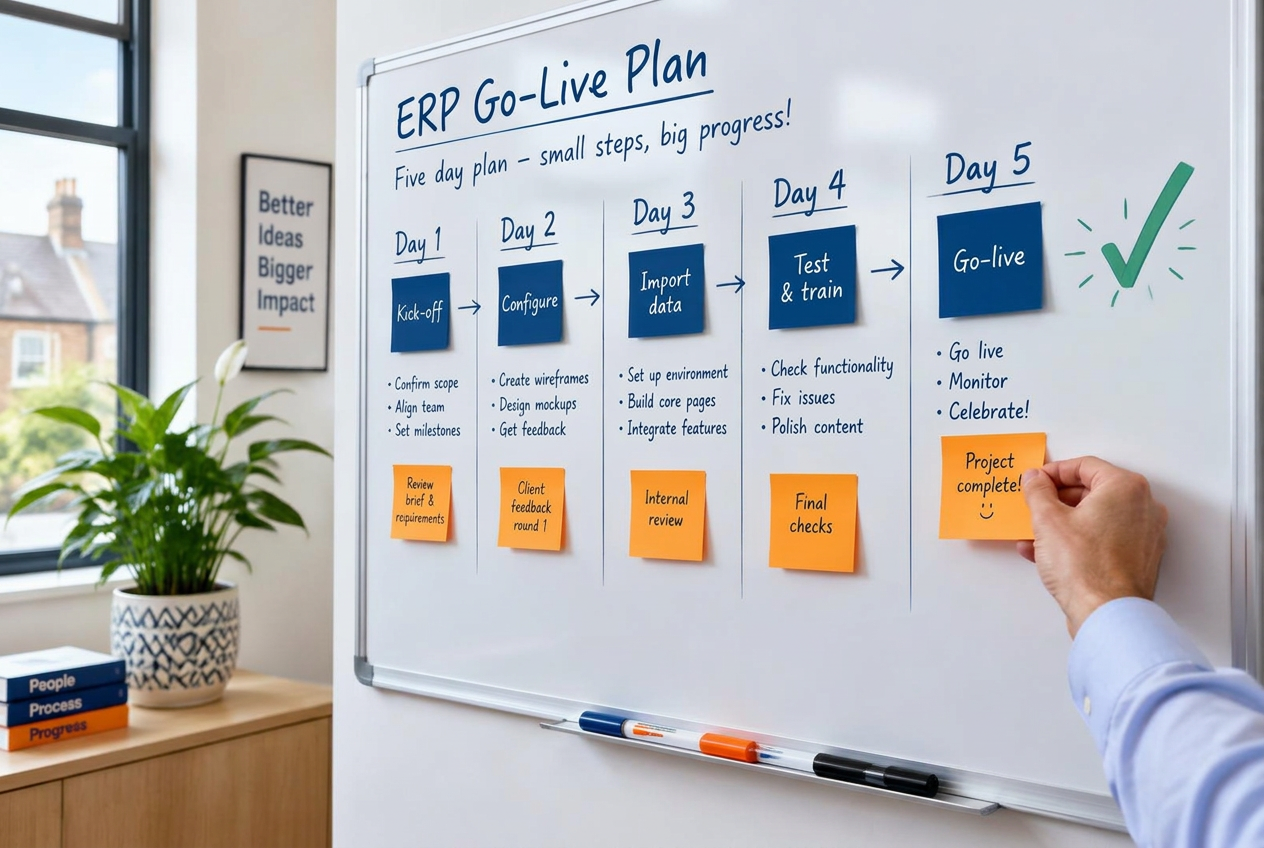
So what actually happens in those few days? Here's a typical five-day plan for a small business that buys, holds and sells stock.
From kick-off to go-live in five working days, then 30 days of fine-tuning
- Day 1 – Kick-off and discovery: agree the scope, map your main processes and hand over your prepared data.
- Day 2 – Configuration: company details, VAT, products, price lists, warehouses, users and permissions.
- Day 3 – Data import and integrations: load customers, suppliers, stock and open orders; connect your shop, bank and couriers.
- Day 4 – Testing and training: run real orders end to end, then train each person on the parts they use.
- Day 5 – Go-live: switch over from your old system, with support on hand throughout the day.
- Days 6 to 30 – The first 30 days: regular check-ins, fine-tuning, extra training, and adding modules such as manufacturing.
Illustrative plan for a small business that holds stock · 5 working days to go-live.
A startup with simple invoicing might complete all of this in a day or two. A small manufacturer or an online retailer with several integrations might spread the same stages over one to two weeks. The order stays the same either way.
Go-live isn't the finish line. The first 30 days are when your team builds confidence, you spot the small tweaks that make everyday tasks quicker, and you decide what to add next. A good provider will check in regularly during this period rather than leaving you to it.
What slows implementations down
When a small business implementation does take longer than a few days, it's almost always for one of these reasons. The software is rarely the problem.
- Data that isn't ready. Customer lists spread across spreadsheets, email and an old accounting package take time to pull together. Duplicate records and inconsistent product codes have to be tidied before they're imported.
- Slow decisions. If nobody has the authority to decide how a process should work, questions sit unanswered and the project stalls. In a small business, that's usually the owner, so block out time for it.
- Trying to change everything at once. Implementing a new ERP is a great opportunity to improve how you work, but redesigning every process before go-live adds weeks. Start with how you work today and improve once you're live.
- Lots of custom requirements. Every bespoke feature needs specifying, building and testing. Most small businesses find the standard setup covers the vast majority of what they need.
- Complex integrations. Connecting to an unusual e-commerce platform, a bespoke website or a specialist piece of software can take longer than standard, well-proven connections.
- Bad timing. Starting a project in your busiest month, or while key people are on holiday, is a reliable way to add delays.
How to get live faster: a preparation checklist
The fastest implementations are the ones where the business has done a little homework first. Work through this list before kick-off and you'll save days.
- Export your customer and supplier lists from your current system or spreadsheets, including addresses, contacts and payment terms.
- Prepare your product list with codes, descriptions, prices, units of measure and VAT rates.
- Count your stock, or agree the date you'll take a stock figure for go-live.
- Gather open transactions, such as unpaid invoices, outstanding purchase orders and open sales orders.
- Talk to your accountant about your chart of accounts, VAT scheme and the best date to switch over, such as the start of a month or VAT quarter.
- Map your main processes on a single page each: how an order becomes an invoice, how stock is bought and received, and, if you manufacture, how a job is made.
- List the other tools you use, such as your online shop, payment provider, courier or bank, so integrations can be planned from the start.
- Name one decision-maker who can answer questions within hours, not days.
- Choose your users and the permissions each person needs.
- Pick a sensible go-live date, away from your busiest period and with key people available.
Most of these tasks take an hour or two each. Together, they're the difference between going live in a few days and waiting weeks.
The bottom line
For startups, micro and small businesses, ERP no longer has to mean a long, disruptive project. With a SaaS ERP that's already configured for your type of business, a clear plan and your data ready to go, you can realistically move from spreadsheets to a fully working system in a matter of days.
The businesses that go live fastest do three things well: they prepare their data, they make decisions quickly, and they start with the essentials before adding extras. Do the same and you'll spend less time implementing and more time running a better business.
Get live with Thrive ERP
Thrive ERP is a SaaS ERP built on Dolibarr and designed for UK startups, micro and small businesses with 1 to 20 users, in manufacturing, wholesale, distribution and e-commerce. Most of our customers are up and running in days, with hosting, security, support and upgrades all included.
Want to know how quickly you could be live? Call us on 0800 772 0241, email welcome@accellier.com or visit www.accellier.com to book a no-obligation chat.